Get Started with Creo Simulation Live
All the resources you need to get started with Creo Simulation Live
Destination or Printer: select Save as PDF
More Settings: In the Options, be sure the boxes Headers and footers and Background graphics are selected.
Table of Contents
Overview: Get Started with Creo Simulation Live
Use this guide as you plan and deploy Creo Simulation Live. Follow the step-by-step instructions and find resources to help you learn from experts and meet business goals.
This information is useful for:
- CAD Admins
- Project Managers
- Stakeholders
- Technical Staff
- Engineers
- Analysts
- Designers
What is a Success Path?
A Success Path is an online guide to help you implement a specific PTC product at your organization. Each path provides step-by-step instructions from the early planning stages all the way through to deployment. Use a Success Path to help your organization get the most out of a product and achieve your business goals.
Did you find this helpful?
Get Familiar with Creo Simulation Live
Explore features and functionality available with CSL and learn how to use them.
01. Explore Features and Functionality
Creo Simulation Live is a rapid prototyping simulation tool. It enables engineers and designers, who are not full-time analysts, to execute 3D simulations on models early in the design process. You can change materials, loads, constraints, or results in real-time and view nearly instantaneous simulation results. You can then visualize the results of the analysis without needing a detailed understanding of the design. As an analyst, you can reduce the number of high-fidelity simulations typically required later in the design process using the results from a concept design generated using real-time simulation.
There is no longer a need to toggle between simulation and modeling or long-solver computations for small iterations. For example, solver calculation can be shrunk by a factor of 5000, and the computation result obtained instantly.
Engineers can easily set up the static structural, modal, or steady thermal simulation at the start of the modeling process, and the results are instantly available on the same screen.
Features and Benefits
- Instantaneous simulation results for parts and assemblies directly in the modeling environment
- Analysis dynamically updates as users edit or create features
- Powered by ANSYS technology
- Run your first simulation in minutes—no need for geometry preparation, meshing, or waiting for results
- Discover problems earlier in the design process when they are straightforward and less expensive to fix
- Produce products that more quickly meet functional requirements and explore more design alternatives faster
- Reduce the wait times associated with traditional simulation tools
- Save analyst time and cost for high-end analysis while eliminating bottlenecks
Types of Analysis Available
Structural Analysis
- Determine the structural integrity of components subject to real-world constraints and loads
- Examine stress and deflection results
Thermal Analysis
- Analyze the effects of intense heat or cold by adding boundary conditions to your geometry
Modal Analysis
- Use the mass and rigidity of a structure to find at which points the component naturally resonates. With Creo Simulation Live, you can use instant modal analysis to provide design guidance within your design process.
Fluid Flow Simulation** Available with CSL Plus
- Complete real-time fluid dynamics tool
- Designed for engineers
- Flow volume geometry extraction, internal and external flow, interactive graphing, streamlines, particle flow
02. Learn the Basics
Traditionally, design engineers and analysts worked in tandem to produce quality products. However, the traditional approach has also increased time to market and abandoned potential solutions that were never tested. As a result, you will need to provide training to your design team to make sure they understand the changes to their workflow. Including an overview of the new design process and effectively using Creo Simulation Live will go a long way to ensure their success.
Recommended Resources
Build your CSL Team
Engage with the employees who will contribute to the success of CSL
Before you begin, complete this step:
01. Identify Stakeholders
Your team is one of the most critical components of a successful deployment of CSL. You will need help from a variety of people to achieve your use cases. Identify who can fulfill these roles on your team:
- Executive Sponsor: Responsible for getting organizational buy-in and understanding the value of Creo Simulation Live. They will also be vital in driving process change compliance within the organization, signing authority, and the decision-makers.
- Champion: Accountable for the success of program deployment. Creates the strategy to generate value from CSL. Forms the team responsible for leading the deployment throughout the organization. Closest to the product.
- Process Lead: Responsible for ensuring the technology is thriving across the program. Works with IT coordinates training, works with compliance, and more.
- Execution Leads: Manages the project and is responsible for driving implementation and executing the champion's plan. They organize subject matter experts and related workshops.
- Subject Matter Experts: Share their expertise, create existing and future design process documentation to support Creo Simulation Live's end-user training. Their ongoing commitment is vital to move the project forward.
- End-users: Uses the design process created for Creo Simulation Live. They should receive training to learn how to use the process for design and analysis.
- Additional Support: Members of IT at your organization can help implement and maintain the technology needed for Creo Simulation Live. They also ensure Creo Simulation Live meets your organization's security and compliance policies.
One person may fill more than one of these roles, or you may have several contributors assigned to each role. Regardless of how you structure your team, make sure there's a leader in place to coordinate across teams and ensure you're achieving your goals.
02. Identify End Users
The key to successfully using CSL is to engage with the end-users of the tool early on. Your primary end-users include all the engineers who use Creo Parametric to design and need to have those designs analyzed. Involving engineers early will ensure they understand the changes to their workflow and how CSL will improve what they are able to accomplish in their role. With CSL, engineers can design faster and more accurately.
Make sure you include the following end-user types:
- Engineers
- Designers
- Analysts
- CAD Admin(s)
03. Roles and Responsibilities
- Systems Administrator: Responsible for the upkeep, configuration, and reliable operation of Creo. They need to be aware of all the changes made to the system.
- Process Lead: Responsible for defining and documenting the overall design process.
- Adoption Lead: Responsible for defining the strategy to help end-users reach their goals using Creo Simulation Live. They are vital to introducing and maintaining end-users usage of Creo Simulation Live.
- Engineers and Designers: Responsible for designing within Creo Parametric and using CSL to analyze and iterate their designs.
- Analysts: Responsible for using Creo Simulation Live to analyze the engineers' design and provide feedback.
Align on a Use Case
Work with your team to determine the value you will receive from Creo Simulation Live
Before you begin, complete these steps:
01. Identify Business Drivers
Document the specific drivers (activities or capabilities) that will deliver the most impact and value to each of your business goals. There will usually be multiple drivers for each business goal. For example, drivers that could help reduce costs may include:
- Reduce the time to analyze
- Improve the first-time design
- Decrease time to production
- Reduce quantity of requests for full design analysis from Engineering
02. Identify Business Challenges
Talk to business leaders about which challenges are preventing your organization from achieving its high-level business drivers. Ask departments about their biggest obstacles. Additionally, start learning how these leaders calibrate their goals and measure success.
For example, if your organization's top business driver is increasing design engineering throughout, your business challenges may include first-time design rework or post-design analysis rework.
Do your best to avoid problem-solving and brainstorming at this point. For now, you should focus only on each challenge and not on the potential solutions.
03. Use Case Examples
Below are just a few examples of how CSL can improve your current design process and solve some of your intricate design and analysis challenges.
Industrial Equipment Industry
Unwanted vibration significantly affects the performance of a customer's products in operation, so the engineering team discovered the need for real-time simulation. Creo Simulation Live is demonstrated to the mechanical engineering department head, a CAD user familiar with simulation principles but not an analyst. The focus was on modal analysis for vibration studies.
The customer agreed that they would dedicate time and resources to an in-product trial to assess Creo Simulation Live. Once the customer understood the tradeoffs between speed and accuracy, they were impressed with their product geometry's rapid and accurate modal analysis. They agreed to invest in Creo Simulation Live.
Electronic Display Industry
The customer wanted to start evaluating their designs early in their development cycle, which would allow them to rule out inefficient designs, reduce their prototype costs and time to market. They also wanted to put the design decisions in the designers' hands, allowing their structural engineers to focus on the high end, complex analyses.
The customer was able to complete multiple design iteration in seconds. Previously, iterations would take weeks at a time. They purchased Creo Simulation Live and, as a result, realized increased quality and performance in their products. They reduced the number of prototypes and decreased their time to market.
Automotive Industry
A company specializing in connector sales, design, development, and production reviewed their Creo Parametric licenses with PTC. The company has several automotive customers who require very high product reliability. Controlling costs and reducing the overall time-to-market for new product introduction while maintaining their products' high reliability is essential.
The ease of use of Creo Simulation Live minimized adoption and training, reducing startup costs. The customer realized increased quality and performance in their products. They reduced product development costs and lowered the overall lifecycle costs.
04. Map Business Challenges to Finalize Use Cases
Estimate the effort, value, and applicability of solving the business challenges you have identified. Work with subject matter experts to make realistic projections. If possible, gather data about operations, quality, financials, and other factors that predict potential value.
Work with stakeholders to select the most valuable use cases. Attempt to tackle significant obstacles with significant returns. If your use case supports your organization's key drivers, you are more likely to get the leadership support for your project needs.
Document your chosen use case(s) and confirm it with project stakeholders.
Document Measurement Strategy
Before you begin, complete these steps:
01. Determine Goals and Metrics
Your goals and metrics will vary, depending on your organization's use case. Start by using the business challenges previously documented and the desired outcome that CSL was selected to solve. These considerations should have been made while aligning on a use case.
Next, specify your goal for addressing the business challenges: how will CSL alleviate the problem? Your goals should be measurable.
Common goals include:
- Improve product quality by allowing engineers to catch problems sooner
- Increase product reliability by allowing engineers immediate insight into the impact of design decision and optimize their designs
- Reduce design time by providing precise and easy-to-understand analysis in real-time directly to your engineers
- Decrease product cost by optimizing design, less rework, and faster time to market
- Decrease product rework costs with a more efficient analysis that reduces errors
- Decrease quantity of prototypes created to accelerate your time to market
Do not forget to also document "soft" metrics, such as customer satisfaction and employee confidence.
After identifying your goals, determine which metrics or key performance indicators (KPIs) measure success.
02. Establish Baseline Metrics
Before you deploy CSL, you must document your organization's "as-is" state. If you fail to establish baseline metrics, it will not be easy to measure whether CSL had a meaningful effect on your organization.
For example, if you are trying to reduce design time on a specific product, quantify how long it takes to design using your current method. In this example, consider the time it takes to design and optimize the product and the time required by the analysts. Once CSL has been deployed, track specific parts and/or assemblies that have been designated as "must use CSL" through their lifecycle to create the "to be" measurement. Once you have both numbers, you can compare them to calculate change.
Establishing your baseline metrics allows for clear articulation of how CSL met the business goals defined at the project start.
03. Document your Measurement Plan
After you identify your goals and metrics, it's essential to document a detailed measurement plan.
The measurement plan should outline:
- Short-term and long-term goals
- Key metrics
- How you will measure key metrics
- The timeline for your measurement plan
- Who will gather and record the metrics
- Dates to share progress and outcomes with stakeholders
Example: Your company may be focused on increasing analysis throughput by decreasing the number of times engineering sends parts/assemblies to the Analysis team for full analysis. First, review past designs and the frequency/quantity of times analysis was requested. Also, look at the number of times the same Part or Assembly was re-sent for analysis. This will establish your baseline. Next, define what your future state should look like. One example could be to decrease the number of requests for analysis from Engineering by 25% within 3 months of making CSL available to design teams. Now, once you have deployed CSL, you can observe new designs and review the frequency of analysis requests.
Share the measurement plan with stakeholders early, and refer back to it throughout the project to ensure you're on track.
Evaluate Hardware and Software
Verify you have the appropriate hardware and software to run Creo Simulation Live on your machines
Before you begin, complete these steps:
01. Confirm Hardware Requirements
The fast computation and superior visual experience in Creo Simulation Live rely on the latest graphics processing unit (GPU) technology. To run Creo Simulation Live, PTC recommends the following minimum hardware:
- A dedicated NVIDIA CUDA-enabled GPU card (Quadro recommended) based on the Kepler, Maxwell, or Pascal architecture. Maxwell 2000 or better strongly recommended
- Most dedicated NVIDIA GPU cards produced in 2013 or later will be based on one of these architectures
- At least 4GB of video RAM (8GB+ preferred) on the GPU.
- Utilizing a hardware configuration from the Platform Support page is strongly advised
To further review your hardware, download the Creo Hardware Checker. We recommend that each of your end-users run this hardware checker before using Creo Simulation Live to ensure they have the hardware for the best experience.
After using the Creo Hardware Checker linked above, if your current GPU does not meet the requirements to run Creo Simulation Live, you will need to consider upgrading your workstation. Creo Simulation Live is heavily dependent on GPU for accuracy of results and speed, so when looking to upgrade your workstation, please keep GPU recommendations in mind. Although there are many options for GPU that meet the above criteria, NVIDIA and PTC have worked together to recommend 5 GPU's for the use of Creo Simulation Live:
- Quadro M4000
- Quadro P4000
- Quadro RTX 4000
- Quadro RTX 5000
- Quadro RTX 6000
Benchmarking has been completed for each of these five cards. This benchmarking was done for each Simulation Type, using a range of GPU models. The benchmarking was first conducted with the lowest recommended GPU, the Nvidia Quadro M4000. Four other GPUs were then tested, and the results were compared against the baseline performance of the Quadro M4000. The following chart outlines each card's performance versus the Quadro M4000 (minimum recommended):
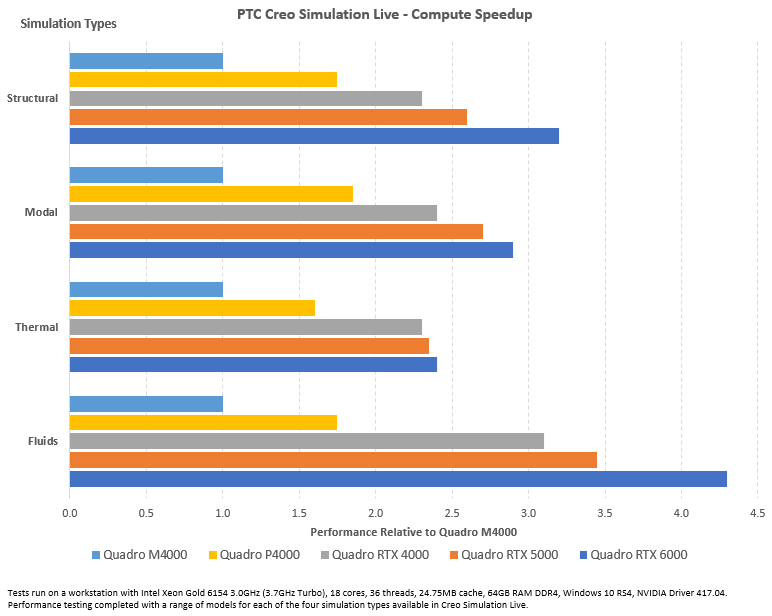
Each of the 5 recommended GPU's comes in at a different price point. Review your company's budget, and align it with the number of workstations needed for Creo Simulation Live and select the GPU that best meets your needs.
You will need to determine whether you or your end users are using desktop PCs or laptop/workstations. For desktops, a GPU can be purchased and installed with minimal effort. However, for laptops and workstations, the GPU is typically mounted to the motherboard, which means upgrading your GPU directly is very difficult to do. In this situation, you would need to evaluate the purchase of an entirely new laptop/workstation for each end-user that does not have or have access to a desktop PC.
02. Confirm Creo Parametric and Windchill Versions
If necessary, you may need to upgrade your current version of Creo Parametric. Creo Simulation Live is available for use in the following versions of Creo Parametric:
- Creo Parametric 4.0 (M090 or later)
- Creo Parametric 5.0 (5.0.4.0 or later)
- Creo Parametric 6.0 (6.0.1 or later)
- Creo Parametric 7.0 (7.0 or later)
You need a licensed version of Creo Parametric to run Creo Simulation Live. Review the Creo-Windchill Compatibility Roadmap to determine your upgrade path. You will need to ensure your version of Windchill is aligned with your version of Creo Parametric, so please review the software compatibility matrix here.
03. Upgrading Creo Parametric and Windchill
If, after reviewing your current Creo Parametric and Windchill versions and determining that an upgrade is necessary for both or either, it is vital to take a step back and evaluate your team's needs and requirements to complete an upgrade to either product. PTC has experts available to help you determine the best upgrade route to take.
If an upgrade is necessary for Creo Parametric or Windchill, it is vital to evaluate your team's requirements to complete the upgrade. PTC has experts available to help you determine the best upgrade route.
Recommended Resources
- Upgrade your Creo Parametric
- Windchill Upgrade Matrices & Admin/Install Guides Resource Center
- Update Advisor eSupport
Assess Changes to Design Processes
Review your existing design process and determine how CSL will drive improvements to that process.
Before you begin, complete these steps:
01. Document Existing Design Processes
Gather your team, specifically the designers and analysts, and begin evaluating all aspects of the current design process.
Your team should start by looking at the four core steps of CAD design.
- Understanding Design Requirements: Identifying what exactly needs to be designed. This includes a list of requirements related to size, shape, weight, a factor of safety, durability, etc.
- Geometric Modeling: A mathematical technique that is completed by using simulation software. It shows the object from the math formula through computer graphics.
- Engineering Analysis: The process of checking the strength of moving objects to determine how they work in the real world.
- Design Review and Evaluation: Design is reviewed and evaluated with the help of CAD software. The feasibility of the design is also checked.
Go step by step to evaluate who interacts at each stage and how they complete their work. Complete this activity for the New Part design process and your Part revision process and rework processes. Tools such as Microsoft Visio can be used to map out these processes. You will want a digital copy primarily for your company’s records and training events and communications to end users as part of a full adoption program.
02. Document New Design Processes
Now that you have clearly defined your current design processes, modify them to include Creo Simulation Live. Using the current process mappings, highlight each mention of analysis. Next, insert in proactive analysis steps to be done by your Engineers through product design. After adding these steps, review the highlighted analysis steps to see which can be removed or modified now that your engineers analyze their design.
When defining your new process, it is essential to clearly articulate the timing of the analysis and the analysis to be run. Once you have completed this activity, you will want to create a new set of process documents. These “new process” documents will be leveraged when communicating the upcoming change to your end users and in the training of your end-users. When making significant process changes, it cannot be understated the value of a full adoption plan. This includes a Communication Plan, Adoption/Training Plan, and End User Support plan. These pieces make up your company's Adoption Plan for Creo Simulation Live.
Create an Adoption and Communication Plan
Before you begin, complete these steps:
01. Document your Adoption Program
At the core of every successful adoption plan, there are three deliverables:
- Communication Plan – A set of communication methods derived to ensure all parties are aware and ready for a change.
- Adoption/Training Plan – A set of training and mentoring events designed to ensure all parties understand how the tools will influence their daily jobs.
- End-User Support Strategy – A strategy to take care of End Users in the days immediately following Creo Simulation Live's go-live.
Each of these deliverables plays an integral part in ensuring your company can fully adopt Creo Simulation Live and obtain the business goals you wish to achieve.
Before starting the creation of the above deliverables, begin by creating a list of personas affected by Creo Simulation Live's upcoming addition. Articulate each persona's role and how Creo Simulation Live will affect their day-to-day role.
Some examples of personas in your organization include:
- System Administrator
- Design Engineer
- Designers
- Analyst
- CAD Admin
- End-User Support
Each persona will need a varying degree of adoption planned for them. Having one adoption plan for all personas is not recommended, as it will confuse and overload your end-users.
02. Create a Communication Plan
At a high level, software adoption User types fall into four communication categories:
- Early Adopters are users who want to try the new tool and be a driving force in influencing others to adopt the new tool.
- Early Majority are users who are more practical to new tools and need others to vet it first before jumping in. They would need a little bit of encouragement to use the tool and are more concerned with "What's in it for me?" and will want to know how this new tool will improve their lives.
- Late Majority are users who need a big push to adopt a new tool. Typically, they will only adopt the new tools when it becomes a significant part of your business operations.
- Laggards are users who are opposed to change. They are often uncomfortable using new tools, and they are willing to use the old tools and process as long as possible.
When planning communication, you must first start by identifying the groups impacted by the upcoming change and bucketing them into the four categories above. Next, place the roles/personas inside one of those groups.
Use these questions to guide your communication plan:
- Who are your audiences?
- What methods of communication work best for each audience?
- What does each audience care about the most?
- What do they need to know to be successful?
- When do they need to know it?
- What are the existing or best channels to communicate?
- Who should deliver the message(s) for it to be effective?
- How frequently should communication be done with each audience?
- What do you need from your audiences at different points in time?
- How can your audiences communicate with you?
It is essential to consider leveraging a variety of communication methods when reaching out to your audience. Some examples of communication methods include:
- Project newsletter
- Podcast
- Wiki pages
- Intranet forums
- Sponsorship video
- Change agents
- Information sessions
- Emails
It is important to note that emails alone will not be enough when communicating an upcoming change. Ensure that your communication plan contains various communication methods to ensure maximizing the reach of the message.
In addition to having a communication plan, it is imperative to listen. Establish a process for your internal and external audiences to respond to you. They should provide feedback, voice concerns, and share opportunities.
03. Create an Adoption Plan
When creating an adoption plan, it is best to start by defining the impacted roles. Role-based training plans are the best way to minimize the amount of time your users are in training and maximize their time doing their job. Creating a role-based training plan starts by identifying the curriculum. Introduction classes are fantastic for a broad audience but often lack details specific to a specific role. We recommend that you begin by identifying the curriculum applicable to all users and then identify role-specific training.
When composing a role-specific training plan, it is best to create a curriculum based on the new business processes. Linking the new process to the role's daily job and then training them on the new actions using the new tool is the most efficient way to train users.
After identifying your curriculum, the next step is to determine which roles require which curriculum. Associating the curriculum's length to its value is also beneficial. This way, you can understand the total time needed for each role to attend training. This information is valuable to share with both end-users and managers so that there is a clear expectation of the time it will take to learn the new tools processes before returning to work.
One other thing to consider is a timeline for training completion. Having clear expectations around the use of a tool post-training is very important. End-Users will need to be informed of these expectations to ensure that the new tool's improper use is prevented.
After laying out your curriculum plan, the next item to address is the delivery of that curriculum. Training the trainer approach is recommended, as it:
- Creates Subject Matter Experts within the organization
- Removes the need for outside instructors
- Enhances your Support Strategy
- The instructors can be leveraged to address product usage issues.
To fully train your trainers, you will need to ensure they fully understand:
- How the tool can be used
- How the tool will be used
- How each role will leverage the tool
- How the tool will impact each role
You will then need to make sure that the instructors are comfortable with the content and then schedule their time to deliver end-user training leading up to and after the release of Creo Simulation Live.
The last item to consider when planning your adoption plan is localization and translation. Where are your teams located? Will English be the language of choice for the training material? These are things you will need to factor into your adoption plan to ensure equal adoption across geographies. Consider the effort needed to train the trainer and how localization could impact this. You will need to ensure you have trainers in each geography ready to lead in whatever the preferred language may be.
Develop your CSL Support Strategy
Specify which teams are responsible for various aspects of the tool and how they will triage issues.
Before you begin, complete these steps:
01. Best Practices to Support CSL
Develop processes for post-deployment technical support to Creo Simulation Live users. Ideally, all sponsors, engineers, designers, and other users should know whom to contact and how to resolve adoption issues.
As you design your support model, there are several best practices to follow:
- Utilize the existing support process. Creo Simulation Live is an add-on tool within your existing Creo software. It is essential to inform and train your support team on the changes that CSL brings to Creo.
- Create documentation. Thorough documentation is crucial for the long-term supportability of the solution. The support organization needs documentation about using the tool if they are expected to identify resolutions to issues, fix bugs, and promptly perform system maintenance.
02. Determine and Document a Support Strategy
Create a plan for how your organization will maintain and address potential issues that may arise in the day-to-day operations. Here are a few points to keep in mind:
- Roles and responsibilities: Who should deliver support? The duties may span different functional areas. For example, one team may be responsible for machine connectivity, and another oversees application maintenance. Your IT team most likely has a “Help Desk,” which will be your first contact point for support. Determine how the teams will triage issues among the various experts at different functional areas.
- Escalation: How will your support team escalate issues that are outside their domain of expertise? How will they handle complex problems that require additional expertise? In a tiered support model, your team will evaluate issues to determine the root cause and triage accordingly. Your support team should contact PTC eSupport for any product-related problems or questions.
Finalize and document the application support process—outline which is the first point of contact and escalates potential issues. Verify everyone in the support organization agrees to the process and is prepared to execute it. Plan checkpoints throughout the year to ensure the process is working and improve if necessary.
Ensure your end-users know how to get help should issues arise with Creo Simulation Live.
To access PTC technical support, you will log a case with PTC eSupport. Once received, a member of the technical support team will assist you.
Recommended Resources
- Create eSupport Account eSupport
- Log a Support Case at PTC eSupport eSupport
Go Live with CSL
Configure the licenses for your end-users and turn on CSL within your Creo Parametric. Execute the plans created previously in Plan and Go Live with CSL.
Before you begin, complete these steps:
01. Troubleshoot the Enablement of CSL
Creo Simulation Live's license follows the rules of other extensions for Creo Parametric, which means it is obtained at startup and released upon exit. Creo Simulation Live installs automatically with specific versions of Creo Parametric, and there is no need to check an option to install it. Ensure the Creo Simulation Live license is moved to Selected from Available when installing Creo Parametric. It might be necessary to reconfigure the installation if the license was not moved to Selected and customize the Command Configuration. Here you can find details on how to reconfigure Creo Parametric.
If the CSL tab not visible in Creo, try the following:
- Check config.pro options for enable_creo_simulation_live set to NO
- The value should be YES, or delete the value and restart Creo
- Check your ribbon customizations to ensure you have not disabled the tab
- Datecode without CSL
- Refer to What version of Creo Parametric has ANSYS Discovery Live as Creo Simulation Live
Recommended Resources
- Getting started with Creo Simulation Live in Creo Parametric eSupport
- Creo Parametric License, Install and Reconfigure Central Resource Page eSupport
- Error "Features Not Obtained - CREO SIMULATION LIVE" on starting Creo Parametric, configured with Simulation LIve eSupport
- How to update FlexNet Admin License Server (Imadmin) with a new license file eSupport
- Creo Installation Central Resource Page eSupport
02. Communicate to End Users
The person or group responsible for communicating with end-users should notify all users that the app is ready to use. Refer to your communication plan and follow up on any remaining communication and training items.
Make sure your end-users are ready to use the new functionality. They will need to know:
- How to log in
- How to use the app
- How to get support or training
- Where to find documentation
- How to get support
03. Run Adoption Program
Ensure that everyone who will use CSL has the knowledge they need to get started. Follow the training plan you created earlier in the project. End-users include anyone at your organization who will use CSL to do their jobs. End users will need access to the Creo and a license.
Gather your trainers and process leads. Ensure your end-users know when training is available and how to access it. Also, ensure your trainers have the time and availability during this critical time. Prompt and adequate training will ensure your users will confidently use the tool.
It's important to note that adoption is the key to ensuring maximum value attainment from the software. Tracking your end-users' attendance at training sessions can be an effective way of ensuring adoption is met.
Make sure to consider offering training at a variety of times. The goal is to maximize the number of end-users that attend training. Providing options will improve attendance.
Review CSL Metrics
Analyze the success of CSL by reviewing the metrics provided by your team and the system
Before you begin, complete these steps:
01. Analyze Success of CSL
Now that the tool is live and accessible to all users, review your measurement strategy. Give the team some time to get acquainted with the tool to ensure successful results. At a minimum, we recommend waiting 30-90 days to review with the main end-users on how it is going. This review period allows for adequate time to capture data and let the new processes to take hold. This time can be extended based on the timetable you established when initially creating your measurement plan.
Consider the following:
- How has CSL improved the design process?
- Are engineers creating high-quality designs more efficiently with fewer errors?
- Are designs being analyzed quicker?
- Is the number of requests for analysis decreasing?
- What is the end-user feedback on Creo Simulation Live?
02. Capture New Baseline
Share the results and any adjustments to your value propositions with the project sponsor, project team, organizational leaders, end-users, and other stakeholders. It is important to share these results so all stakeholders are informed about the tool's value. Reviewing these results can also help you strategize the next steps.
You provide a clearer picture of value if you continue to measure and report your findings over time. Continuing to communicate to the end-users on the tool's value helps make the value real to them and reinforce the tool's usage.
Overview: Get Started with Creo Simulation Live
Use this guide as you plan and deploy Creo Simulation Live. Follow the step-by-step instructions and find resources to help you learn from experts and meet business goals.
This information is useful for:
- CAD Admins
- Project Managers
- Stakeholders
- Technical Staff
- Engineers
- Analysts
- Designers
What is a Success Path?
A Success Path is an online guide to help you implement a specific PTC product at your organization. Each path provides step-by-step instructions from the early planning stages all the way through to deployment. Use a Success Path to help your organization get the most out of a product and achieve your business goals.
Did you find this helpful?
Get Familiar with Creo Simulation Live